
PRICING ENGINE FOR LTL GROUPAGE
Nobody should have to guess if the price is too low.
Margin is set once, per direction, tiered by shipment size. The operator quotes; the company decides what it earns.
Margin is policy
Tiered per direction and shipment size. Nobody at a keyboard can override it.
Every quote has an outcome
Won or lost, with your reason and what it earned.
Your tariffs as they arrive
572 of 572 price cells extracted exactly, on two real carrier pricelists.
Everybody calculates as they want.
Every forwarder prices differently. Excel bends to any logic. That’s why it beat every rigid pricing tool this industry has been sold.
It’s also why the same shipment can leave your office with three different prices, depending on who quoted it, which file they opened, and what they remembered to check.
A single groupage quote can pull from an international tariff PDF, two terminal price lists, a partner’s rates, and a CBM-to-LDM conversion done by hand, across nine open tabs and one person’s memory.
Groupage distribution tariff — Novafreight Cargo Ltd.
Terminal HUB-01 → whole country · prepared for: Partner Forwarder · valid from 01.01.2026 · EUR
| kg / zone | I | II | III | IV |
|---|---|---|---|---|
| 100 | 24,40 | 23,68 | 19,41 | 22,55 |
| 500 | 31,46 | 29,60 | 31,31 | 41,05 |
| 1000 | 48,26 | 52,09 | 54,57 | 72,89 |
| 2000 | 78,93 | 84,34 | 88,55 | 118,31 |
ADR +15% · loose cargo +30% · thermo +50 EUR / shipment
Calculation basis: 1 cbm = 250 kg · 1 ldm = 1 250 kg
Max one colli: 1 500 kg · L + W ≤ 3.8 m
TARIFF_2026_v17_USE_THIS_ONE.xlsx — Excel
fx =INDEX(Tariffs!$B$5:$L$15, MATCH(B4,$A:$A,0), MATCH(C4,$1:$1,0))
| ldm | I | II | III | IV | V |
|---|---|---|---|---|---|
| 0.4 | 58 | 67 | 72 | 82 | 93 |
| 1.2 | 104 | 122 | 138 | 149 | 168 |
| 2.0 | 148 | 176 | 188 | 223 | 241 |
| 3.2 | 217 | 251 | 273 | 308 | 356 |
| 13.6 | 723 | 805 | 897 | 1 061 | 1 172 |
Tomas K. — don’t quote zone V without checking the new surcharge
Inbox · 1,247 unread
Re: Re: Re: KL surcharge update — URGENT
Novafreight Cargo · Tue 14:22 · 6 attachments
Confirming what Tomas mentioned — the surcharge for stackable cargo over 1.5 ldm is now 18 €, not 14 €. Effective immediately.
Please update before quoting. Last week the old number was still in the sheet.
Three of the nine tabs behind one quote. In RateGate, one model.
That’s not a discipline problem. It’s a tooling problem.
RateGate keeps what Excel got right: your logic stays yours. Your zones, your margins, your exceptions: the engine runs them the same way, on every desk.
And when the one person who “knows the rates” is on holiday?
With the logic in the system instead of in someone’s head, coverage, onboarding, and consistency stop depending on memory.
Nobody types the margin.
You set it once, per direction, tiered by shipment size in LDM, KG or CBM. After that it stops being a decision anyone makes at the keyboard.
Per direction
Different lanes price differently, and a small shipment can carry more margin than a full load. You write the table; the engine applies it the same way on every desk.
No override
Operators and salespeople cannot change the margin on a quote. It’s enforced in the engine, not hidden in the interface. There is no field to find.
The tier follows the cargo
Each margin table carries its own LDM, KG and CBM ratios, so a shipment lands in the same tier whichever terminal collects it. The tier is a property of the cargo, not of the routing.
Scoped oversight
A lane manager sees quote history and the dashboard for the directions you grant them, in both orientations, without seeing the rest of the company’s commercial data.
The margin that gets recorded is the one that was applied, stored exactly, not worked backwards from a total. So the percentages you report on are the percentages you charged.
Paste the inquiry. Get the price.
Three short recordings from the app. No edits, no speed-up.
01
Parse the inquiry
This is a real inquiry, pasted exactly as it arrived: abbreviations, missing fields and all. The parser reads it into cargo lines, and the operator verifies the numbers.
02
Price the options
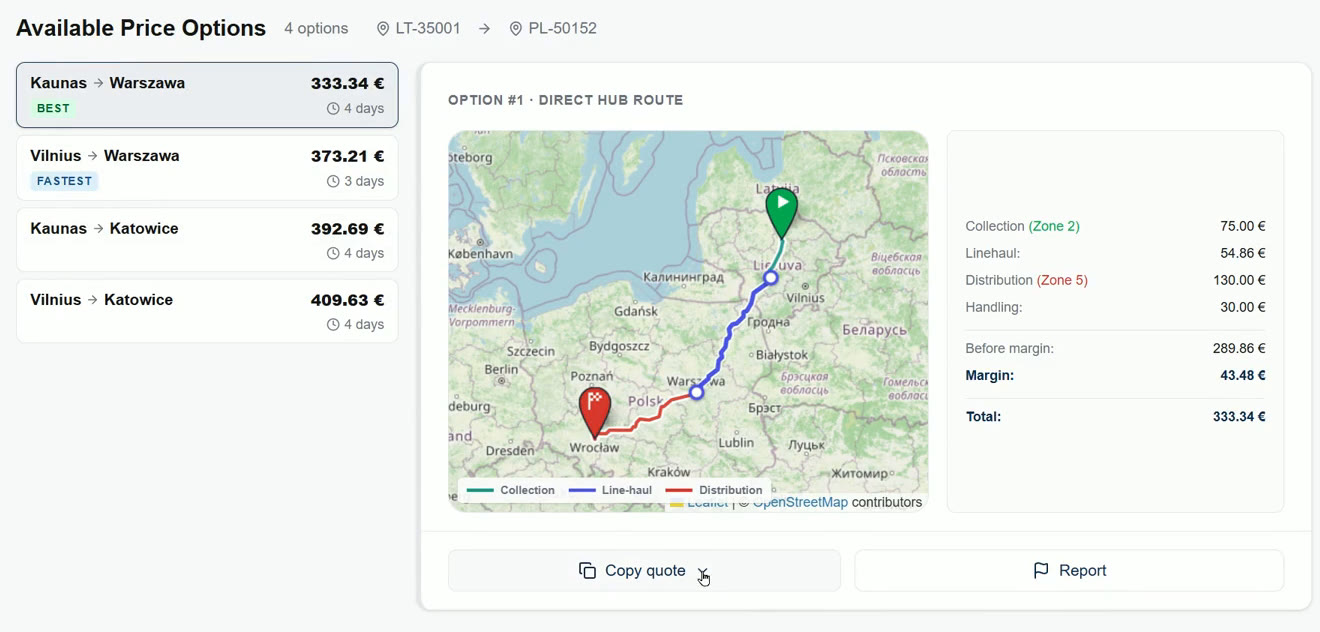
The engine returns priced route options across the network, direct and via hub, with days in transit. Every option shows how its number was built.
03
Copy the quote
One click copies the finished quote: route, price, and transit days, formatted for the reply. Paste it back to the customer without retyping a number.
Every quote gets an outcome. Every outcome gets a number.
A quote in a spreadsheet stops existing the moment it’s sent. Here it becomes a record: what it cost you, what you asked for it, and what happened next.
Won or lost
Mark a quote won with the price actually agreed, or lost with a reason. The offered price is editable, so a discount negotiated on the phone is recorded instead of disappearing into an email thread.
Your loss reasons
You write the list. The categories are whatever your business actually loses on, not the ones we thought you might.
Cost, margin, offered price
Every row carries the best cost, the margin in money and percent, the price offered, and the outcome. One line per quote, and the line is complete.
The dashboard
Calculations, won, lost, open, win rate, and realized profit on won quotes. By person, by lane, by loss reason, over a date range you choose.
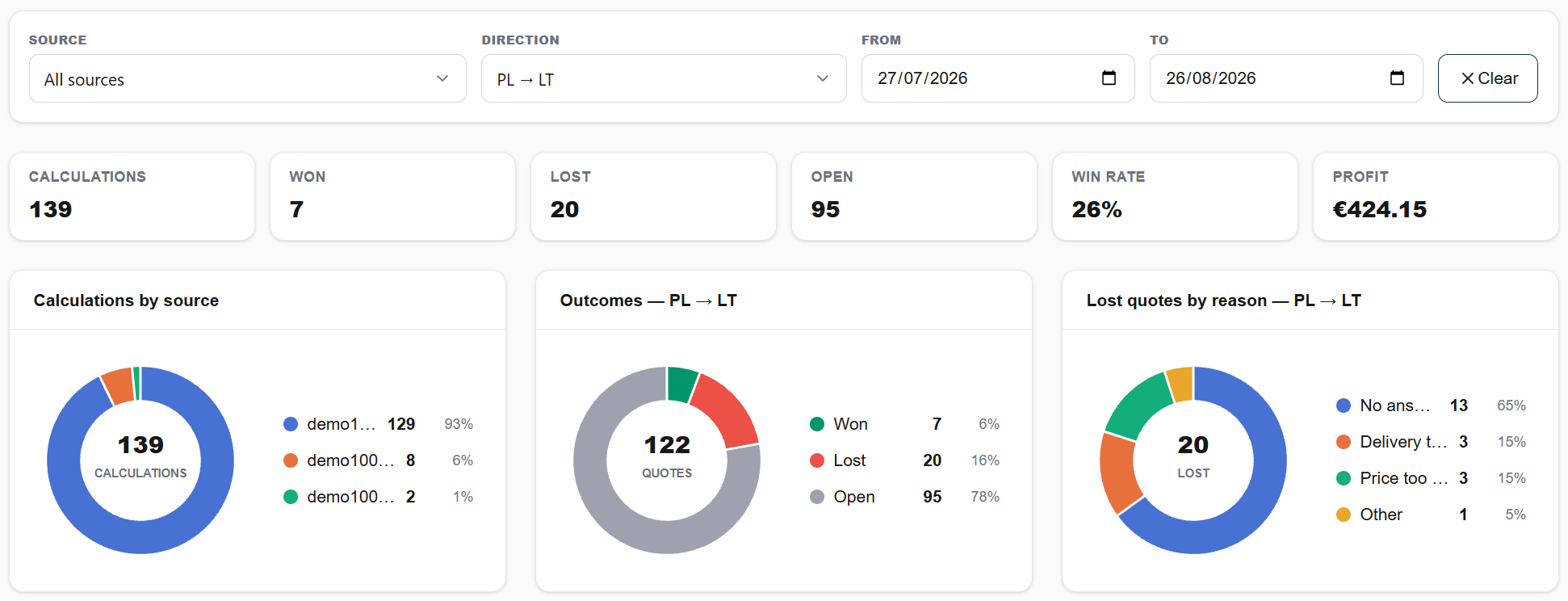
Every operator also gets their own book: their quotes, their search, their own win rate, and nothing company-wide.
This is the part a spreadsheet cannot give you. Not because Excel is bad at arithmetic, but because a quote in a spreadsheet has no memory of what it cost, what you asked for it, or whether it came back.
What the engine does
Calculate
Postal codes and cargo in, priced route options out, in seconds. Quote while the customer is still on the phone.
Show the logic
Every quote shows how the number was built: which tariff, which terminal costs, which route. No more “how did we get this price?”
Compare the network
Partner rates, route options, and terminal pricing side by side. The engine checks the lanes your operator wouldn’t have time to.
Audit everything
Every quote, every input, every change is logged per user, with roles for the whole team. When a price from March gets disputed, the answer is one click away.
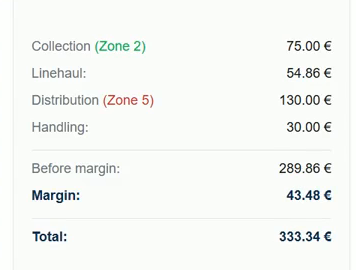
Why the number can be defended.
The AI reads your documents. It never calculates: every total is computed in code, so the same inquiry always produces the same numbers. 28 golden pricing cases run on every change, and a one-cent difference fails the build; an intentional price change happens only through a deliberate, logged re-baseline. A separately written implementation of the pricing rules cross-checks the engine.
Your tariffs, as they arrive.
Partner tariffs turn up as PDF, Excel, Word, scans. The import parsers read them into your network model: zones, breakpoints, prices, units. The engine then prices from the documents you already hold.
572 of 572
price cells extracted exactly
Measured on two real carrier pricelists. The approach it replaced lost an entire weight column on one of those files, and 8 of 9 zones on the other.
Fix conflicts as you type.
Overlapping postal ranges are the usual reason a quote comes back with no price at all. Conflicts appear in the browser while you type: every conflicting pair at once, each showing the exact shared range. A one-click fix follows the engine’s own precedence rules and therefore cannot change a price.
You don’t have to bring forty tariffs to start. One lane is enough to find out whether the number comes out the way your desk would price it.
What is RateGate
RateGate is pricing software for LTL groupage freight forwarders. It calculates quotes from a forwarder’s own tariffs, terminal pricing, partner rates, and CBM/KG/LDM conversions: one engine, deterministic output. The same inputs produce the same quote for every operator, on every shift. Partner tariffs are imported as they arrive, as PDF, Excel or Word, and parsed into the forwarder’s network model, so the forwarder’s pricing logic stays their own. Every quote shows how the number was built, and every quote, input, and change is logged. Margin is applied as company policy, tiered per direction and by shipment size, and operators and salespeople cannot override it. Every quote is recorded with its cost, the price offered, and whether it was won or lost, and a dashboard reports win rate and realized profit by user, lane, and loss reason. RateGate is built for small-to-mid European LTL forwarders and 3PL networks, starting in the Baltics and CEE.
Built by the people who did this job.

Edvin Fedorovič
Co-founder & CEO
Ten years in logistics, most recently running an LTL groupage pricing department. RateGate exists because he watched good operators produce inconsistent quotes and knew the problem was the tooling, not the people.

Tomaš Maconko
Co-founder
13+ years of software development and engineering management.

Gabrielius Kazakevičius
Co-founder
8+ years of software development.

Andžej Korovacki
Co-founder
8+ years of software development, focused on reliable, scalable systems.
One founder from the pricing desk, three from engineering. That’s the product: pricing-department reality, turned into an engine.
Start with one lane.
Bring one direction you quote often, with the tariffs exactly as you hold them. We configure that lane, then price inquiries you’ve already quoted so you can put our number next to the one you sent. That’s the whole test: does it come out the way your desk would price it?